Integrate Trezor devices with your project
Explore Trezor Connect SDKs
Trezor Connect is a tool for seamless integration of Trezor hardware wallet with third-party apps and extensions. Built with a developer-friendly interface, it ensures secure interactions for Trezor users within these apps.
There are couple of options how to integrate Trezor devices with your project. This page walks you through installation and lets you explore SDK API.
Node.jsREADME
View on Github
README
View on Github
WebDOM requiredREADME
View on Github
README
View on Github
About
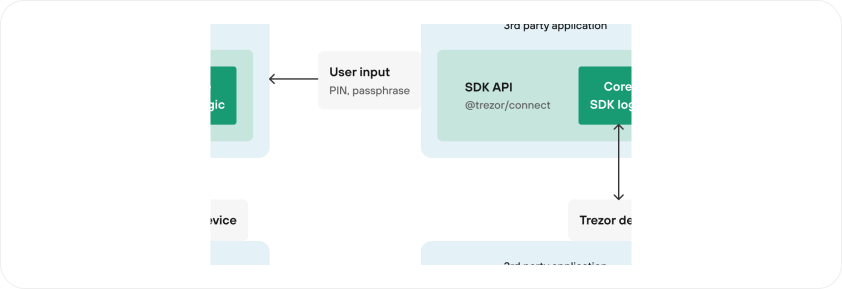
@trezor/connect-web ships a thin API layer that routes requests to one of two runtime modes:
Suite Desktop WebSocket (preferred when Suite Desktop is running) or Suite Web popup hosted on connect.trezor.io.
User input (PIN, passphrase, confirmations) is handled inside Suite Desktop or the popup, isolated from your application.
Examples:
Web extensionUsing service workerREADME
View on Github
README
View on Github
About
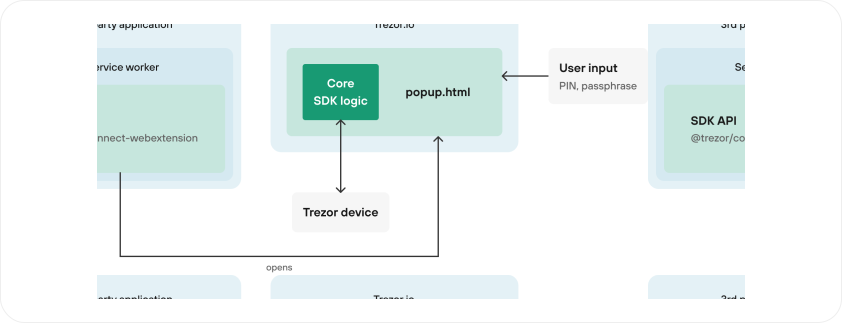
In case of @trezor/connect-webextension, TrezorConnect object is created in a service worker.
In this env we can't inject iframe so we use a mode similar to popup mode in @trezor/connect-web, where we load SDK logic in the popup.
This however does not build persistent connection between SDK and 3rd party application meaning that events cannot be used.
Learn step-by-step
Learn how to integrate the @trezor/connect-webextension package into a Chrome extension, allowing secure connection to Trezor hardware wallets. By the end, you'll have a fully functional web extension.
Open Tutorial →
Examples:
MobileUsing deep linkingREADME
View on Github
README
View on Github
About
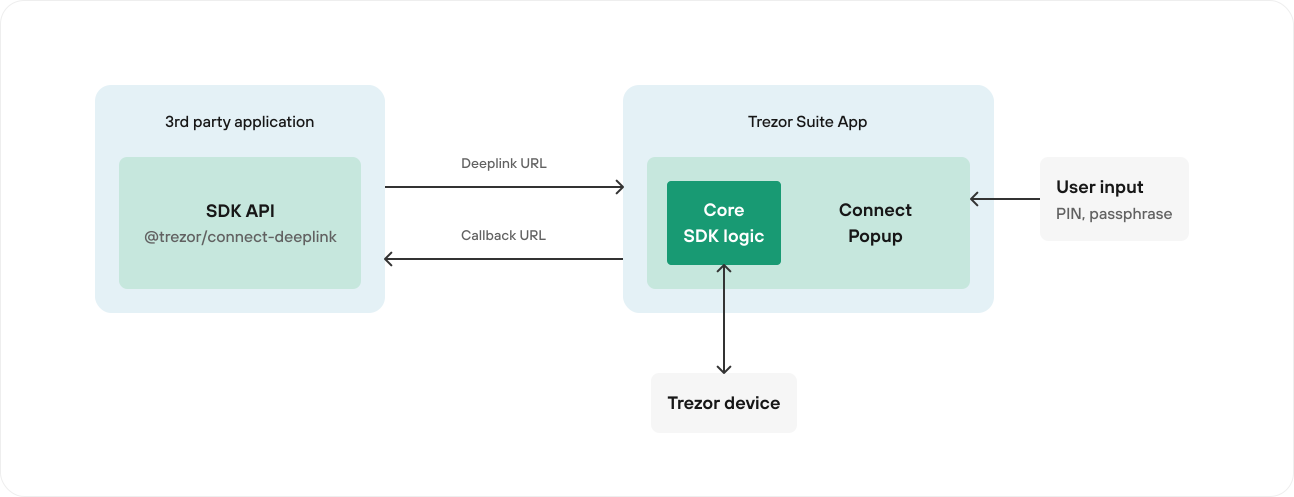
@trezor/connect-mobile is a package that allows you to communicate with Trezor devices from your mobile app.
This package is somewhat different from the other SDKs, as it doesn't provide a direct API to the device. Instead, it uses deep linking to open the Trezor Suite app and communicate with the device.
Use deep linking without SDK
If you are not able to use the SDK, for example on non-supported platforms, you can still use deep linking to open the Trezor Suite app and communicate with the device.
This can be done by implementing the following specification.
Deep linking specification